
If you have ever stared at a print spec sheet and wondered what a pt to mm conversion actually means, you are not alone. Points and millimeters show up constantly in printing, labeling, and packaging design, yet nobody ever sits you down and explains the two side by side. One is a leftover from old typesetting rooms. The other is the metric standard almost every packaging plant works in. Once you know how they relate, reading a spec sheet gets a lot less confusing.
Packaging teams run into this mix of units almost daily. At Contipack Inc, prepress files often list type sizes in points while the film thickness and box dimensions sit in millimeters on the same page. Knowing how to move between the two saves a lot of back-and-forth with a printer.
What Does Pt Mean in Measurement?
A pt, short for point, is a typography unit that goes back to the early printing press days. Printers needed a small, consistent unit to size type, and the point has stayed a standard across the printing industry ever since. So what does pt mean in measurement today? It is simply a fixed fraction of an inch, standardized so software and printers agree on the same size every time.
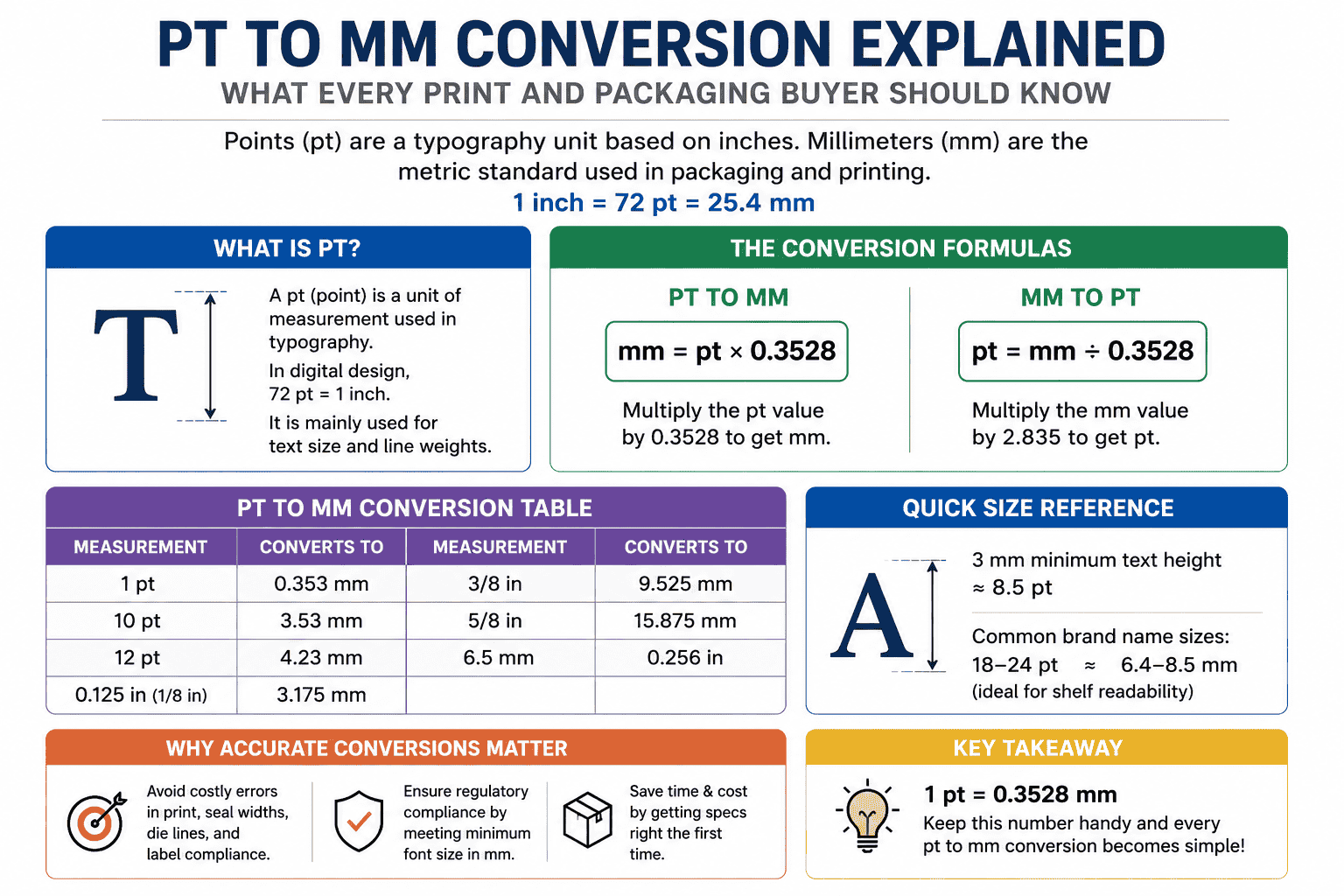
Most software today uses the desktop publishing point, often shortened to DTP (Desktop Publishing), where 72 points equal one inch. That single number is the key to every conversion you will run between the two units. If someone asks what pt stands for in measurement, the short answer is: a small, precise slice of an inch used mainly for text and line weights.
The Conversion Formula
Here is the math involved. Since one inch equals 25.4 millimeters, and one inch equals 72 points, you divide 25.4 by 72 to get the value of a single point in mm. That works out to roughly 0.3528 mm per point.
So to convert points to mm, multiply the point value by 0.3528. A 12 pt line, for example, comes out to about 4.23 mm. This is the formula behind every pt in mm calculation, whether you are checking a font size or a hairline rule width on artwork.
How Big Is a Pt, Really?
On its own, a point is tiny. A single pt measures about a third of a millimeter, which is why pt size only becomes meaningful once you’re looking at a full line of text or a stroke weight. Ten points, a common body text size, sits close to 3.5 mm tall. That gives you a decent sense of scale without pulling out a ruler.
Print designers working on a Cracker Packaging bag often set ingredient text at 6 to 7 pt, since shelf space is tight and every millimeter of copy matters. Knowing that a 7 pt line prints at roughly 2.5 mm helps a designer judge readability before the file ever reaches a press.
Mm to Pt: Converting the Other Way
Going from mm to pt is just the formula in reverse. Take your millimeter value and divide by 0.3528, or multiply by 2.835, to land on the equivalent point size. A 5 mm cap height, for instance, lands close to 14 pt.
This direction matters most when a client hands over a spec in millimeters and the design software only accepts points. Rather than guessing, run the mm to pt math once and lock the number into a style sheet so nobody has to redo it later.
Conversion Table
Packaging files rarely deal with points alone. Inches, millimeters, and fractional measurements all show up on the same drawing, so having a quick reference on hand keeps everyone speaking the same language.
| Measurement | Converts To |
| 1 pt | 0.353 mm |
| 10 pt | 3.53 mm |
| 12 pt | 4.23 mm |
| 0.125in to mm | 3.175 mm |
| 3/8 in mm | 9.525 mm |
| 5/8 in to mm | 15.875 mm |
| 6.5mm to inches | 0.256 in |
A quick note on pts to mm at larger sizes: the relationship stays linear, so doubling the point value always doubles the millimeter result. That consistency is what makes pt to in conversions equally straightforward once you know the base formula.
Bag structures built for Granola Packaging are a good example of why this table earns its keep. Film gauge is measured in microns, seal widths in millimeters, and the printed nutrition panel in points, all on one production sheet.
Font Sizes in Mm and Why They Matter on Packaging Labels
Regulatory bodies in many countries specify minimum font sizes in mm rather than points, since millimeters translate cleanly across metric packaging lines. A rule requiring 3 mm minimum text height, for example, works out to roughly 8.5 pt in most standard typefaces.
This is where font sizes in mm and mm to font size calculations actually affect compliance, not just aesthetics. A label that looks fine on screen in points can fail a legal minimum once measured in millimeters on the finished pack.
Brand names on Soap Packaging cartons commonly run at 18 to 24 pt, which converts to roughly 6.4 to 8.5 mm. That range tends to stay legible on a shelf from a normal viewing distance, which is part of why it shows up so often in cosmetics and personal care packaging.
How to Change Pt to Mm in Illustrator
Anyone asking how to change pt to mm in Adobe Illustrator usually just needs to swap the default measurement unit. Open Preferences, go to Units, and set Type to Millimeters instead of Points. Illustrator then displays and accepts type sizes in mm across the whole document, which is useful for any typography work that needs to match a metric spec sheet.
If you only need to check one value without changing the whole file, type the number directly into a field with “mm” after it, like 4mm, and Illustrator will convert it automatically. That trick works for stroke weights, spacing, and most numeric fields in the program, which is handy when a client abroad searches for the same steps as pt naar mm.
Inches to Mm: Quick Reference for Packaging Specs
Packaging drawings mix fractional inches with millimeters more often than people expect, especially on gusset widths, seal margins, and zipper placement. Converting 0.125 in to mm gives 3.175 mm, a common seal allowance on smaller pouches. A 5/8″ to mm conversion lands at 15.875 mm, which shows up often on flap depth for folding cartons.
Reading a spec sheet gets easier once these numbers feel familiar rather than needing a calculator every time. Whether the artwork sits on rigid board or Flexible Packaging film, the underlying math stays identical; only the tolerances change based on the material.
Why Accurate Conversions Matter for Packaging Buyers
A small rounding error in a point-to-millimeter conversion rarely matters on a business card. On a packaging run, the same error multiplied across thousands of units can shift seal placement, throw off die lines, or push a label out of regulatory range. Precision at the file stage saves a reprint later.
This is especially true on flexible formats, where tolerances are tighter. A mismeasured dimension on a Vacuum seal pouch order can mean film that does not sit correctly on the sealing bar, which turns into wasted material and a delayed shipment.
Buyers working across Pakistan, the Gulf, and North America run into this constantly, since specification sheets rarely arrive in one consistent unit. A local printer might quote in points out of habit, while an export client wants everything confirmed in millimeters for customs and compliance paperwork. Keeping both figures on hand from the start avoids a round of email back-and-forth right before a production deadline.
A Few Practical Habits Worth Building
Save the core numbers somewhere you will actually see them again. A sticky note near your monitor with “1 pt equals 0.3528 mm” saves more time over a year than most people expect, especially for anyone approving proofs regularly.
Double-check units before a file goes to press, not after. Design software will happily let a stray inch measurement sit next to a millimeter one without flagging anything, and that mismatch only shows up once the printed piece lands on a desk.
Keep a short conversion table pinned inside your project folder if you manage several packaging formats at once. Cartons, pouches, and labels often carry different tolerance rules, and having the numbers close by beats searching for them mid-approval.
Frequently Asked Questions
Q1: What is 1 pt in mm?
One pt equals roughly 0.3528 mm. It is a small unit on its own, which is why it only becomes easy to visualize once you compare it against a full line of text or a stroke width.
Q2: How do I convert pt to mm?
Multiply the point value by 0.3528 to get millimeters. For example, 8 pt multiplied by 0.3528 comes out to about 2.82 mm, and the same formula works for any point size.
Q3: How many mm is 12 pt?
12 pt converts to about 4.23 mm. That size shows up often in body text and mid-weight rule lines on packaging artwork.
Q4: What is the difference between pt and mm?
A pt is a typography unit built around fractions of an inch, mainly used for text and line weights in design software. A mm is a metric length unit used for physical dimensions like box size, film thickness, and seal width. Packaging files typically use both at once, just for different purposes.
Q5: Why do printers use pt instead of mm?
Points give finer, more consistent control over small text and line weights than millimeters typically allow in design software, and the unit has been standard across the printing industry since the early days of typesetting. Millimeters take over once the measurement shifts to physical packaging dimensions.
Final Thoughts
Points and millimeters will keep showing up together on packaging files for as long as design software and metric manufacturing coexist. Once the formula is second nature, reading a spec sheet takes a fraction of the time it used to. Keep 0.3528 mm per point in your back pocket, and every future Points and millimeters question becomes a quick mental calculation instead of a search.